Ruby on Rails5 にて ユーザ登録の実装をしたので手順を忘れないように記載しておきます。
usersテーブル
テーブルの準備をします。
$ rails g model user name:string email:string password_digest
$ rails db:migrate
パスワードカラムは password_digest にしておきます。
Gemfile
パスワードをセキュアにしてくれるライブラリを使用します。Gemfileに以下を追記します。
gem 'bcrypt'
routes
/signupというURLでユーザ登録したいと思います。
get "signup" => "users#new"
Controller
  def create
    @user = User.new(user_params)
    if @user.save
      session[:user_id] = @user.id
      flash[:notice] = "ユーザー登録が完了しました"
      redirect_to("/users/#{@user.id}")
    else
      render("users/new")
    end
  end

  def user_params
    params.require(:user).permit(:name, :email, :password, :password_confirmation)
  end
View
<%= form_with(model: user, local: true) do |form| %>
  <% if user.errors.any? %>
    <div id="error_explanation">
      <h2><%= pluralize(user.errors.count, "") %> 件のエラーがあります。</h2>

      <ul>
      <% user.errors.full_messages.each do |message| %>
        <li><%= message %></li>
      <% end %>
      </ul>
    </div>
  <% end %>

  <div class="field">
    <%= form.text_field :name, id: :user_name, class: 'form_txt', placeholder: 'ユーザ名' %>
  </div>

  <div class="field">
    <%= form.text_field :email, id: :user_email, class: 'form_txt', placeholder: 'メールアドレス' %>

  </div>

  <div class="field">
    <%= form.password_field  :password, id: :user_password, class: 'form_txt', placeholder: 'パスワード' %>

  </div>

  <div class="field">
    <%= form.password_field :password_confirmation, id: :user_password_confirmation, class: 'form_txt', placeholder: 'パスワード(確認用)' %>

  </div>

<% end %>
パスワード項目にpasswordとpassword_confirmationの2つを追加するのがみそです。
仕上がりイメージ
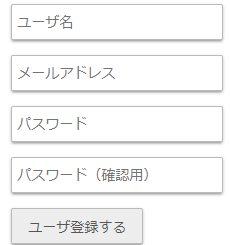
という感じで出来ました。結構はまってしまいました・・。